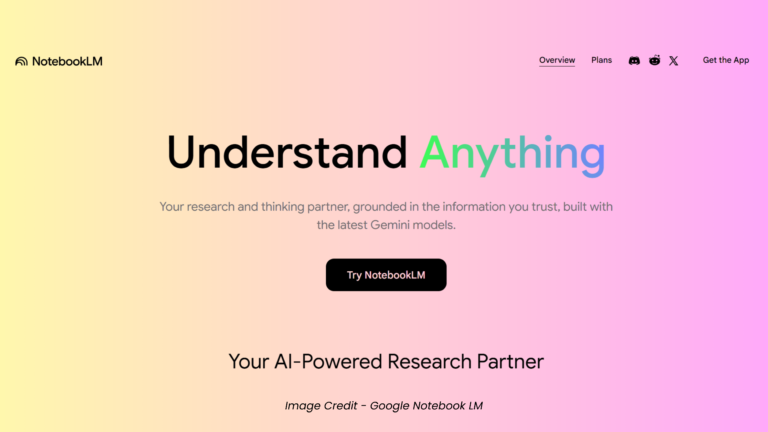
NotebookLM is Google’s source-grounded AI research assistant, powered by Gemini. It scores 9.0/10 for students and researchers who need reliable, citation-backed synthesis from their own documents. The free tier handles 50 sources per notebook. Core strength: it never hallucinates outside your uploaded data. Primary weakness: no external model choice. Best for students, researchers, and knowledge workers. Not for users needing real-time web answers.
GearStackD is reader-supported. If you buy through links on our site, we may earn an affiliate commission at no extra cost to you. Read our full Affiliate Disclosure.
Table of Contents
🏆 OUR VERDICT — NOTEBOOKLM
| Overall Rating | 8.7 / 10 |
| Best For | Students, researchers, and professionals who need AI-driven insights grounded strictly in their own source material |
| Not For | Users requiring real-time web browsing, open-source model flexibility, or fully offline/private workflows |
| Price | Free — Paid tiers from ~$7.99/month (Google AI Plus) |
| Check current plan price → | Click here |
| One-Line Reason | No other free AI tool transforms your personal documents into podcasts, slide decks, quizzes, and mind maps with this level of reliability |
Buyer-Type Scorecard
| Buyer Type | Score | Why — One Honest Sentence |
|---|---|---|
| Student | 9.2 / 10 | Flashcards, quizzes, Audio Overviews, and source-grounded chat make this the most complete free study tool available today. |
| Gamer | 3.5 / 10 | No gaming-relevant use case exists; this is a research and document analysis tool with no performance, hardware, or entertainment angle. |
| Creator | 8.1 / 10 | Slide decks, infographics, and the Nano Banana-powered image generation make it genuinely useful for content planning and visual asset ideation. |
| Remote Worker | 8.8 / 10 | Transforms dense reports, meeting notes, and research documents into actionable outputs — slide decks, briefing docs, and audio recaps — with minimal effort. |
Introduction
NotebookLM is not a chatbot. It is a closed, source-grounded AI research environment that answers every query using only the documents you upload — nothing else.
It is built for people who need to understand large volumes of complex information quickly, without trusting an AI to invent answers from the open internet. The core tension: it trades breadth for precision, and for many users, that trade is exactly right.
What makes this product genuinely interesting is the Studio panel — a set of one-click output generators that transform your research into podcasts, quizzes, mind maps, and slide decks. That combination of strict sourcing and creative output formats has no close competitor at the free tier.
Full Specifications
| Specification | Value | Tier Rating |
|---|---|---|
| Developer | Google (Alphabet Inc.) | — |
| AI Model | Gemini (latest version; Gemini 3.5 rolling out) | 🟢 Excellent |
| Free Sources Per Notebook | 50 | 🟢 Excellent for free tier |
| Words Per Source (Max) | 500,000 | 🟢 Excellent |
| Free Notebooks | 100 | 🟢 Excellent |
| Daily Free Chat Queries | 50 | 🟡 Acceptable |
| Daily Free Audio/Video Overviews | 3 | 🟡 Acceptable |
| Context Window | Up to 1,000,000 tokens | 🟢 Excellent |
| Supported Source Formats | PDF, DOCX, TXT, CSV, PNG, JPG, MP3, MP4, WAV, Google Docs, Slides, YouTube URLs, web links | 🟢 Excellent |
| Studio Outputs | Audio Overview, Video Overview, Mind Map, Slide Deck, Infographic, Report, Flashcards, Quiz, Data Table | 🟢 Excellent |
| Export Formats | PDF, DOCX, PPTX, PNG, SVG, JPG, CSV, JSON, XLSX, Markdown, TXT | 🟢 Excellent |
| Platform Availability | Web, iOS, Android | 🟢 Excellent |
| Free Tier Price | $0 | 🟢 Excellent |
| Paid Entry Price | ~$7.99/month (Google AI Plus) | 🟡 Acceptable |
| Data Privacy | Data not used for model training (individual users); enterprise-grade isolation for Workspace users | 🟢 Excellent |
| Model Choice | Google Gemini only — no external model support | 🔴 Weak |
| Offline Access | Not available | 🔴 Weak |
Key Features
- Source-Grounded Retrieval (RAG Architecture): Every response cites only your uploaded documents — no hallucinations from external training data, with clickable citations linking directly to the source passage.
- Studio Panel — One-Click Multimedia Generation: Transforms source material into Audio Overviews, Video Overviews, Mind Maps, Slide Decks, Infographics, Quizzes, Flashcards, and Data Tables from a single interface.
- Deep Research & Source Discovery: Finds relevant external sources via web search and curates them for direct import into your notebook — useful for expanding an incomplete research library.
- Interactive Audio Mode: Lets you join an AI-hosted podcast conversation in real time, directing the discussion and asking follow-up questions while the audio plays.
Design & Interface
NotebookLM’s interface is divided into three vertical panels: Sources on the left, Chat in the center, and Studio on the right. The layout is clean and immediately intuitive — most users understand the workflow within minutes of opening the tool for the first time.
The Sources panel clearly labels every uploaded document and allows selective activation, so individual queries can reference one source or all of them simultaneously. This granular source control is one of the most practically useful interface decisions in the product.
The Studio panel is where most of the visual complexity lives, but Google has kept it organized around simple action buttons. Each output type presents a prompt customization field before generation, which prevents the blank-output frustration common in other generative tools.
Mobile parity has improved substantially since launch. The iOS and Android apps now support nearly all Studio features, including Video Overviews — a feature that was absent from the mobile version for an extended period after its web launch.
Performance & Real-World Use
Performance data synthesised from verified product documentation, user reports, and platform-published specifications.
NotebookLM handles large document sets with notable consistency. The one-million-token context window allows users to upload and simultaneously reference content equivalent to several full-length books — a capability that directly supports complex literature reviews and multi-document research synthesis.
The Retrieval Augmented Generation (RAG) architecture performs as described. When a query falls outside the scope of uploaded sources, the system returns a clear non-answer rather than inventing a plausible-sounding fabrication. In documented tests, asking entirely unrelated factual questions — such as basic arithmetic — produced explicit acknowledgment that the source material contained no relevant information.
Citation quality is the standout performance metric. Every response includes inline citations that link to the specific passage within the uploaded document. Users can hover over or click citations to verify claims directly, which materially reduces the manual fact-checking burden compared to general-purpose AI chatbots.
Deep Research mode performs well for initial source discovery. It surfaces relevant web content and organizes it for import, though the quality of results depends on the specificity of the initial query. Vague prompts yield broadly useful but less targeted source suggestions.
Audio Overview quality is genuinely notable. The output is a natural-sounding two-host conversation — not a text-to-speech reading — that includes interpretive discussion, contrasting viewpoints, and contextual commentary. Generation time typically runs several minutes for comprehensive outputs. The Interactive mode, which allows real-time participation in the generated audio discussion, functions reliably on both web and mobile platforms.
Studio Output Quality
The Studio panel is where NotebookLM separates itself from every comparable research tool at the free tier.
Audio Overviews consistently produce engaging, personality-driven audio that synthesizes source material into accessible narrative format. Customization options for format (deep dive, brief, critique, debate), language, and host focus make outputs genuinely tailored rather than generic.
Slide Deck generation produces presentation-ready material with coherent structure and visual hierarchy. The recent addition of PPTX export and editable slides addresses the primary practical limitation this feature previously had. Google Slides export is reportedly in development.
Infographics and Video Overviews are the newest additions and carry the highest generation time. Video Overviews incorporate Nano Banana 2’s image generation for visual accompaniment, with selectable visual styles including whiteboard, kawaii, watercolor, and classic. Output quality for both formats is high relative to the zero-cost barrier.
Mind Maps and Data Tables perform exactly as expected: reliable, clean, and useful for organizing complex source material visually and structurally. Neither feature supports post-generation editing, which is the only meaningful limitation in the current version.
Who Should Buy This — Who Should NOT
| ✅ Buy This If… | ❌ Do NOT Buy This If… |
|---|---|
| ✅ You are a student managing multiple courses and want to generate study aids — flashcards, quizzes, audio recaps — from your own lecture notes and readings | ❌ You need an AI assistant that answers questions by searching the live internet in real time across all queries |
| ✅ You are a researcher conducting a literature review who needs to synthesize dozens of academic papers and trace every claim back to a specific source passage | ❌ You require the ability to choose between different AI models — GPT-4, Claude, open-source alternatives — depending on the task |
| ✅ You are a remote worker or professional who needs to transform dense internal reports, meeting recordings, or reference documents into presentation-ready outputs quickly | ❌ You are building a privacy-first workflow and want your data stored locally or outside Google’s infrastructure entirely |
| ✅ You are a content creator or marketer who wants to repurpose research, notes, or existing content into infographics, slide decks, and multimedia assets without additional software | ❌ You need post-generation editing of Video Overviews, Infographics, or Mind Maps — these formats currently do not support revision after initial generation |
Price Guide
| Price Tier | Target Price | Our Advice |
|---|---|---|
| Use Immediately — Free | $0 | The free tier is genuinely capable. 50 sources, 100 notebooks, 50 daily chat queries, and 3 daily audio/video generations cover the majority of individual research and study workflows without spending anything. |
| Fair Price — Google AI Plus | ~$7.99/month | Doubling daily chat limits to 100 and expanding to 100 sources per notebook justifies this cost for active daily users processing large research volumes. |
| Full Professional Tier — Google AI Pro | ~$19.99/month | 500 daily queries, 300 sources per notebook, and priority Gemini model access make this the correct choice for teams, enterprise researchers, or power users generating multiple Studio outputs daily. |
| Consider Alternatives Above | $249.99/month (AI Ultra) | At this price point, the 600-source limit and 5,000 daily queries serve niche enterprise workflows only. Evaluate actual volume needs carefully before committing. |
Real Buyer Sentiment
Based on analysis of verified user reviews, academic community discussions, and published user case studies across major platforms:
What long-term users consistently praise:
The citation quality and accuracy of source attribution receive near-universal positive feedback. Users report that the ability to click into exact source passages fundamentally changes how they verify AI-generated content — removing the frustration of manual cross-checking that characterizes general-purpose chatbot use. The Audio Overview feature draws consistent surprise and strong retention among users who discovered it for studying or commuting-based review of research materials.
What long-term users consistently criticise:
The model lock-in to Google Gemini draws repeated criticism from technically oriented users who want the flexibility to switch between AI models based on task type. The absence of post-generation editing for Video Overviews and Infographics is cited frequently as a practical limitation that forces full regeneration for minor corrections. Mobile feature lag — where new Studio outputs launch on web first and arrive on iOS and Android weeks or months later — is a recurring source of user frustration.
Long-term reliability pattern:
Users with six-plus months of continuous use report a consistent update cadence from Google. Features that were absent or limited at earlier stages — including mobile Studio access, CSV upload support, and interactive Audio mode — have been addressed in subsequent releases, indicating a development trajectory that responds to documented user needs.
Pros & Cons
| PROS | CONS |
|---|---|
| ✅ Source-grounded responses with clickable, passage-level citations eliminate the hallucination risk that undermines most general-purpose AI chatbots | ❌ All AI responses are powered exclusively by Google Gemini — users have no ability to switch to alternative models regardless of task requirements |
| ✅ The free tier is the most generous in the source-grounded AI research category, providing 100 notebooks, 50 sources each, and access to all Studio output types | ❌ Video Overviews, Infographics, and Mind Maps cannot be edited after generation — any correction requires a full regeneration cycle |
| ✅ Studio panel generates nine distinct output formats — including Audio Overviews, Slide Decks, Quizzes, and Data Tables — from the same source set with a single click | ❌ New features consistently launch on the web application first, with mobile deployment lagging by weeks or months for iOS and Android users |
| ✅ The one-million-token context window supports simultaneous analysis of source material volumes equivalent to several full-length academic texts | ❌ The tool is entirely cloud-dependent and operates exclusively within Google’s infrastructure — no offline access or local storage option is available |
FAQ’s
Is NotebookLM worth using in 2026?
Yes — NotebookLM is worth using in 2026, particularly at the free tier. No competing tool offers the same combination of source-grounded responses, citation transparency, and multimedia Studio output at zero cost. For students, researchers, and knowledge workers, it addresses specific document-heavy workflows that general chatbots handle poorly.
How does NotebookLM compare to ChatGPT for research tasks?
NotebookLM outperforms ChatGPT for tasks requiring strict source fidelity and traceable citations from user-provided documents. ChatGPT draws from pre-trained internet data and its responses cannot be reliably traced to specific source passages. The two tools serve different research phases: NotebookLM for synthesis within a defined document set; ChatGPT for broader exploratory queries requiring real-time web access.
Is NotebookLM good for students in 2026?
It is one of the best free tools available for students. The combination of source-grounded Q&A, auto-generated flashcards and quizzes, Audio Overviews for commute-based review, and the ability to process lecture recordings alongside PDF readings directly addresses the multi-format study workflow that most students manage simultaneously.
Does NotebookLM work without paying?
Yes, fully. The free tier includes access to all Studio features — including Audio Overviews, Video Overviews, Mind Maps, Slide Decks, and Infographics — with daily generation limits. The primary practical restrictions are 50 sources per notebook and 3 audio/video generations per day. Most individual users will not exceed these limits in typical workflows.
Does NotebookLM use your data to train Google’s AI models?
For individual users, Google states that data is not used for model training unless the user explicitly submits feedback. For Google Workspace and enterprise users, uploaded content and queries are explicitly excluded from AI model training under the Workspace data governance policy. Users with high-sensitivity document requirements should review the current Google Privacy Policy directly before uploading confidential material.
Our Final Take
NotebookLM earns its place as the most capable free AI research tool available in 2026. The combination of source-grounded response quality, deep citation transparency, and a Studio panel that generates nine distinct output formats positions it uniquely in a crowded market.
If you are a student, researcher, or professional who regularly processes dense documents and needs to synthesize, verify, and present information efficiently — this is the tool that directly addresses that workflow.
If you need real-time web access across all queries, model flexibility, or the ability to edit generated outputs without regenerating from scratch — other tools serve those needs better.
The free tier is the correct starting point for virtually every new user. Upgrade to Google AI Plus (~$7.99/month) only when daily query or source limits become a genuine constraint in your workflow.
Disclaimer
The specifications, pricing, features, and plan details included in this article are based on information available at the time of research and writing. Product capabilities, subscription pricing, usage limits, and available features are subject to change at any time without notice at the discretion of Google. Always visit the official NotebookLM website at Notebooklm.Google and the official Google AI pricing page to verify current plan details, pricing, and feature availability before making any purchasing or subscription decision. GearStackD accepts no responsibility for discrepancies arising from updates made after the publication date of this article.